
Every Notary we know wants more business. If that is you, read on for how you can increase your business and get free advertising that could double or triple your revenue. The following article gives you specific guidance on creating and perfecting your Google Business Profile, one of the most effective and free advertising tools the world has ever seen!
When Carol Ray first established Notary2Pro, people found notaries and loan signing agents through word-of-mouth, networking, and various directories. Today, in marketing any product or service, including your Notary Business, Google is an essential tool. Why? What is the first thing many people do when looking for anything? They Google it. How many people do you think search for “A notary near me”? According to research on Google Analytics ( A web analytics service offered by Google that tracks and reports website traffic. It is used to measure the number of searches, user behavior, and other key metrics related to websites), this term is searched nearly one million times per month. Add in searches like “Notary Public,” “Mobile Notary and “Notary Service,” and you have another half million million searches. Establishing a strong online presence is crucial for attracting clients and staying competitive in the market. One of the most powerful tools available for this purpose is Google Business Profile.
A Google Business Profile is free tool provided by Google that allows business owners to manage their online presence across Google, including Search and Maps. It helps businesses provide essential information like location, services, and hours directly to potential customers.
Understanding the Importance of a Google Business Profile
One of the biggest challenges for Loan or Notary Signing Agents and Notaries is marketing themselves to find steady revenue. Google is one of the most powerful tools for increasing your visibility online and attracting more customers. And the best part is it won’t cost you a red cent.
Loan Signing Agents still get most of their work through referrals, networking, directories, and past experience. But, if you want to enhance your business with general notary work, a Google Business Profile is essential. Many Notary2Pro graduates surveyed report that anywhere between half and three-quarters of their work comes from Google searches. And, even if the loan signing work doesn’t come in through Google directly, chances are good but it will still enhance your reputation and authority.
Why not?
Some notaries think this is too difficult and too expensive; they may not want personal details like an address shared. But guess what? In the following pages, we will show you how easy it is, how you can do it for free, and how you can protect your privacy!
To be successful at this, you will also want to maintain and update your sight, but we are going to show you how very easy this is. We include this information in our course. Some schools are charging extra for training in this area. We suggest you try it yourself first, and then, if you need further support or guidance based on your results, contact us or another reputable source of training or coaching.
So Why Update your Google Business Profile?
- You can be found easily by customers searching for a Notary
- You are advertising your Notary business without cost
- Your Notary business gains trust through your presence and reviews
- You gain round-the-clock visibility with potential clients and customers
- Your local authority and reputation as a legitimate Notary business increases
- Search visibility and reach start here!
- More income streams for your business
What is a Business Profile?
Google Business Profile (formerly My Business) is a free marketing tool provided by Google. It allows business owners to manage how they appear in online tools like Google Search and Google Maps. When you set up a Google Business Profile, the photos and other details of your business — including location, services, and products — are used across Google, increasing your visibility to prospects in online search. Even if you are a typical Notary Business, in other words, a sole proprietor, work from home, don’t have a website, and don’t sell products, you are still eligible for a profile.
How to set up a Google Business Profile for Notary
Google makes it very easy to set up a profile. Additionally, tons of free resources can walk you through the process; just… Google it. Google doesn’t share the number of profiles that exist globally, but suffice it to say they have millions, perhaps hundreds of millions. If they can do it, so can you!
Step-by-step
Step 1: Log in to Google Business Profile
You need a Google account to use Google Business Profile, so go ahead and create one if you haven’t already.
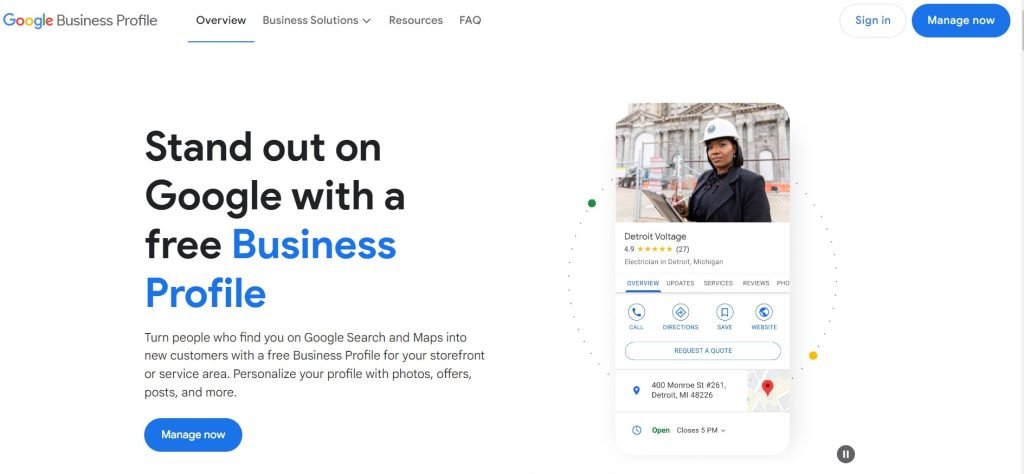
Notary2Pro recommends not using your personal Google account to set this up. Remember, you may want to give others access to your Google Business Profile later, and that’s better to do from a dedicated work account, all separate from your personal information. You need a professional email anyway.
Step 2: Add your business information
Once you’re signed in, Google Business Profile asks you for your business name. Enter one and click Continue.
Step 3: Select your business type
You can sign up for a Google Business Profile as long as you sell directly to customers online, have a physical location, or provide a service in person. You can select all options that apply to you. Most notaries do not have physical products, and unless you are based in a public office where people will walk in to use your services, you will not choose those options.
Click Continue.
Choose your Notary business type.
Step 4: Enter your location and location targeting
If you’re an online-only business, Google asks for your website. It’s a good idea to have a website, but not strictly necessary. For notaries, it is imperative to select the areas you are willing and able to support. Local searches are critical.
You will typically choose Notary Public. This category is essential if notarization is a key service. It’s a straightforward and universally recognized term that directly communicates the primary function of the business. You can also choose Loan Signing Agent if your services specifically include handling real estate transactions and loan documents. Remember Google Business Profile allows you to select a primary category and additional categories. This is useful for showing the range of services you offer. Your primary category should be the main business focus because Google uses this for listing and search purposes. Additional categories can be added to reflect other services you provide, such as “Loan Signing Agent” or “Notary Public,” depending on which is not the primary.
Benefits of Accurate Categorization:
Search Optimization: Proper categorization helps your business appear in search results when potential clients are searching for specific services like “notary public” or “loan signing agent.”
Select the country where your business is registered. That should be the US for just about anyone reading this article.
These next steps are a little tricky for notaries. If you work out of your home, you will not want to have your home address displayed for the world to see. However, Google has an answer to that. Just list your service areas.
If you have a physical business location, you’ll enter that instead (you can add your website URL and more information later). For most Notaries, you will not need this. You may also be asked to position a marker for the location on a map for accuracy. If your business does not have a location customers can visit but offers in-person services or deliveries, you can list your service areas.
Remember, if you didn’t enter a physical address, Google will ask you to specify which region you’re based in. Choose the right answer from the dropdown menu and click Next.
Step 5: Add your contact information
You can add either a website, phone number, or both. These are publicly viewable on your profile.
Answering a phone number is very important for notaries! You can learn more about it in the Notary2Pro course and elsewhere on this website.
Step 6: Verify your notary business
Enter a mailing address to verify. Don’t worry! This is for Google to verify you are who you say you are. Your information is not published unless you put your address in the section we discussed above. Double-check it!
After that, you can choose to receive a verification code via email. It’s much easier than other options! Enter your verification code. Once you have been verified, you can publicly reply to customer reviews and use the messaging features.
Step 7: Optimize your profile
Now, add all the extra details that will get the most out of your profile. All of these are optional, but if they apply to you, be sure to fill them out. Some of the things you want to consider are business hours, chats, where users can send you a message directly from Google search, and a description of your business.
Remember to add the types of signings you do, your experience, training, and what makes you special! Be sure to include information on your experience, your customer service orientation, certifications like Notary2Pro, and areas where you travel or work.
You can add photos. Do not forget to add your Notary2Pro certification and certificate Logo. Photos help generate interest and catch people’s eye in search results, so add a professional photo of yourself. We know some people are uncomfortable with posting a photo, but people respond best to accounts with photos. You can add or edit photos anytime from your Google Business Profile dashboard.
Maintaining your Google Business Profile
Now that you have a Google Business Profile, it is essential to maintain and improve it. Schedule 30 – 60 minutes in your calendar to ask yourself how you can enhance your profile and get better results; it will be time well invested!
Google Business Profile Optimization
There are many ways to optimize your Google My Business profile.
According to Google, people are almost 75% more likely to visit a business with a complete profile vs. an incomplete one. So make sure your profile is complete.
Remember, Google determines local search ranking based on three factors:
- Relevance: How well your profile matches search intent.
- Distance: How far your location is from the user.
- Prominence: In other words, how well-known your business is from things like the number of reviews and the score,
Of course, we love it when you are on the “Google Three Pack.” This means you are on the first page someone searches when searching for a “Notary near me” or something similar. Remember, all journeys start with a single step. Take the first step and explain how to get better results in the next section.
You can also add attribute “labels” to your listing to communicate key information about your business, such as whether you are open by appointment only or to ensure everyone feels welcome. You can even share if your company is women, minority, or veteran-owned
To edit these labels, visit your dashboard and click Edit profile. Scroll down to the More section to find these attributes.
Include keywords in your profile
Adding relevant keywords to your Google My Business profile increases the likelihood of people finding you. What are keywords? These are words or phrases that describe the content on a page or website. They are used by search engines to index content and by searchers to find relevant pages on the internet. Not sure what keywords to include? Check out popular searches with Google Trends and see if any apply to your business. Search for a Loan Signing Agent or Notary in your area and see what comes up!
A good place to start is with the keywords people are already using to find you. You can get these from Google Analytics reports for free.
Please do not just put a random bunch of keywords in your profile for rankings. It’s dumb, but also is counterproductive! It is best to use full sentences and tell a story about your business.
Encourage and answer reviews
Here is something important. We all love good reviews and want 100% five start reviews. No kidding, that would be nice, but the fact is it is probably unrealistic, and for that reason, Google actually rewards businesses with a mix of reviews with better search results. Now, we are not suggesting that you look for terrible reviews for your business! What we are saying is that Google anticipates that anyone getting all five start reviews may be faking it.
While a good review can be an important part of a customer choosing your notary business over another, more reviews are better than one perfect one.
Customers can review your business directly from your profile. But don’t leave this to chance. Instead, share your review link with customers and ASK them to review you.
Add it to your email marketing templates, share it on social media, or create your own shortened link to give to title companies and signing services, and only if appropriate to your signers.
IMPORTANT:
Do not ask for reviews of your signers if you were not hired by them, unless you have specific permission from the title company or signing service.
To find your unique Google Reviews link Go to your Google Business Profile dashboard and click Ask for reviews.
One thing to think about is to use a URL shortener. This a tool that converts long URLs into shorter, more manageable versions that are easier to share. Short URLs are often used in marketing materials to save space and enhance the appearance of promotional content to make it more branded and easier to type. For example: www.Awesomenotaryreview.com
Remember to respond to all reviews, both positive and negative. When a review is positive take the time to thank your customer for sharing their experience. This next step is ver important, for negative reviews, first take a deep breath. Do not respond emotionally! You can also thank the customer for the review. You might want to address or even fix the issue, but we honest and be tactful. The last thing you need to do is come across as emotional or defensive.
One last note on reviews.
You can report inappropriate or malicious reviews and have them removed from your profile. Here is the process:
- Sign in to Google My Business: Go to the Google My Business dashboard and sign in using your Google account credentials. Ensure you have ownership or management rights for the business listing you want to report reviews for.
- Locate the Review: Navigate to the “Reviews” section of your Google My Business dashboard. Here, you’ll find a list of all reviews that have been left for your business.
- Identify the Review: Locate the review that you believe to be malicious or fake. Take note of the reviewer’s name and the content of the review.
- Flag the Review: Click on the three-dot menu icon next to the review you want to report. From the dropdown menu, select “Flag as inappropriate” or a similar option, depending on the wording.
- Provide Details: A dialog box may appear asking you to provide details about why you’re flagging the review. Explain why you believe the review violates Google’s review policies, such as containing hate speech, personal attacks, or being spammy or irrelevant.
- Submit the Report: Once you’ve provided the necessary details, submit the report. Google will then review the flagged review and take appropriate action if it violates their policies.
- Monitor Progress: Google will typically investigate flagged reviews within a few days. You may receive an email notification once a decision has been made regarding the review. If the review is found to violate Google’s policies, it may be removed from your business listing. Not sure if you’re verified? Check your verification status.
Regularly update your information.
Make sure to keep your Google Business Profile up to date. Edit your profile if your business hours change, you get a new phone number, etc. A current profile is a successful profile, and an out-of-date profile is always a failure.
You can also add updates on your business. Every time you do, you are spreading your message!
Did you meet with a happy customer? Take a picture with them (with their permission of course) and post it. Win some new business? Get a new certification? Let the world know on your profile.
Conclusion
Join us for our monthly Round Tables for more information on ways to grow your business. Click here for more information. If you are already a Notary2Pro Elite Loan Signing Agent, be sure to log in to the Graduate Website with all kinds of proprietary information on ways to expand your business. Also, don’t forget to register to be included in the search and verification program we have exclusively for our graduates. Click here. If you are not a Notary2Pro graduate, consider enrolling. You can learn more about how Notary2Pro teaches you to grow your business.
Leveraging your Google Business Profile is essential for notaries, but it’s not the only step you should take to ensure you are thriving in today’s competitive market.
About the author:
Michael Ray is CEO of Notary2Pro, a family business started by his mother, Carol Ray, in 2009. Michael has had a thirty-year career in leadership and executive roles in service industries. He consults with companies on business practices, global talent, and global mobility. He is dedicated to carrying forward Carol’s mission of empowering notaries to have fulfilling and prosperous careers and to raise the bar in the Notary and Loan Signing Agent industries.